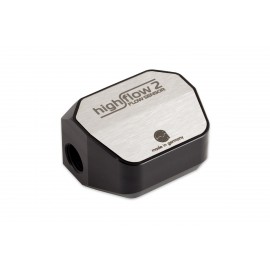
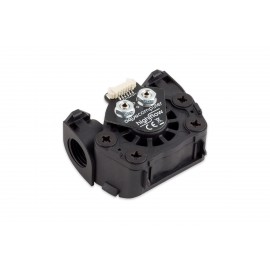
Details
The Aquacomputer G1/4 NEXT RGBpx Flow Sensor - High Flow (53293) is a USB flow sensor with two G1/4 connection threads that measures coolant flow from approx. 35 l/h to 1000 l/h, plus coolant temperature and coolant quality. It connects to an internal USB 2.0 header and is configured on its own OLED display or in the aquasuite software.
Properties
- Thread
- G1/4, two connection threads
- Measuring range
- flow approx. 35 to 1000 l/h, conductivity 2-200 µS
- Interfaces
- USB, aquabus, signal output, RGBpx output
- Display
- OLED, three buttons
- Lighting
- 10 integrated RGBpx LEDs, output for up to 90 more
- Size
- approx. 51 x 43 x 34 mm
Flow measurement
The flow rate is measured by a rotor / impeller driven by the coolant flowing through, and its rotation speed is recorded without contact using a magnetic measuring system. Each sensor gets an optimally calibrated bearing clearance, which ensures minimal running noise. From approx. 35 l / h to 1000 l / h (approximately 9 to 260 US liquid gallons per hour) the sensor delivers reliable measured values and is therefore ideally suited for most water cooling systems. A symmetrical structure allows it to be integrated without considering the direction of flow. In addition, it can be operated in any installation position, and the very low flow resistance meets the requirements of high flow systems.
For measuring the speed of the rotor, the high flow NEXT is equipped with two sensors. In conjunction with the intelligent evaluation, this achieves four times the resolution of the measurement compared to the other sensors in Aquacomputer's high flow series. Preset calibration curves stored in the integrated electronics enable high-precision flow measurement. Calibration curves are available for DP Ultra or pure water as well as for various connection types, and the flow rate can also be calibrated manually.
Coolant quality and temperature
Integrated into the sensor is a very precise measuring system for the electrical conductivity of the coolant. It can measure conductivity between 2-200 µS, and the reading is used to determine the quality of the coolant, with limits preset for DP Ultra. The conductivity of the coolant increases sharply if corrosion occurs or if the corrosion protection inhibitors are used up, and in this case the coolant should be changed. A very precise and fast water temperature sensor is built in as well.
A temp connector takes one more water temperature sensor. With that second sensor, the high flow NEXT can calculate the power dissipated in the loop from the temperature difference and the current flow rate. Aquacomputer places the two sensors at the radiator inlet and outlet port for this.
Highly integrated electronics
The highly developed electronics carry an OLED display, an alarm buzzer and a complete RGBpx system. The USB interface handles both the power supply and the data connection to the PC. You can configure the sensor conveniently, directly via the display and three buttons. Every measured value can be shown on the graphic display as a value and as a diagram, and the display pages are freely selectable and can be switched automatically.
Every sensor can be evaluated with alarm limits. An alarm can be displayed acoustically via the integrated buzzer and optically via the LEDs, and forwarding can take place via the signal interface. The signal output is also able to simulate a flow signal for another device, or to output a speed signal for mainboards (100 l/h then corresponds to 1000 RPM). Through the aquabus interface, data from the high flow NEXT can be transmitted to a connected aquaero 5/6. Power can also be supplied over aquabus as an alternative to the USB interface, however, the RGBpx functionality is then not available.
RGBpx controller for addressable LEDs
Ten integrated RGBpx LEDs give direct visual flow control. In the standard configuration they represent a circulating flow indicator whose speed depends on the flow. The effects can of course be configured freely in the aquasuite, and made to depend on sensor values.
In addition, an RGBpx output gives individual control of up to 90 addressable LEDs, each set individually in terms of color and brightness. A total of six LED groups of variable sizes can be configured, and visual effects are then assigned to them. There are 23 available effects, and they offer extensive setting options for further customization. Many of them also offer the option of modifying effect parameters (e.g. speed) depending on the current sensor values. The available effects include sound-to-light effects that react to the sound the computer is currently putting out. Aquacomputer calls the AMBIENTpx effect an outstanding function. It enables the edge areas of the current screen content to be reproduced on the connected LEDs, whereby, in Aquacomputer's words, a very effective background lighting can be implemented around the computer screen.
Installation
For the best performance and least noise, the buttons and the white illuminated area of the sensor face upwards. The accuracy of the flow rate measurement depends strongly on how the coolant lines run to and from the sensor. It is best when the coolant flows dead straight in and out, so a straight section of the coolant line is the place for it wherever possible. Angled hose connectors work, but with reduced accuracy.
What you need to connect it
The included internal USB cable goes to an internal USB 2.0 header on the motherboard; take special care that the pin alignment matches. By default the sensor draws a maximum of 0.5 Amps from USB, and with many LEDs connected the brightness is reduced accordingly. A limit of 2 Amps can be activated, but only if the maker of the USB port explicitly specifies it for at least 2 Amps. The signal output reaches a fan connector through the signal cable 53294 or a miniature connector through the signal cable 53295. As an alarm output it triggers the motherboard's power switch header through the cable 53216. None of these cables is included in delivery. For a second water temperature sensor, the inner/outer thread sensor for VISION (53219) is Aquacomputer's example. The coolant itself, Double Protect Ultra or pure water, is the one the calibration curves are made for.
Compatibility
Aquacomputer lists these aquabus devices for the aquabus connector:
- aquaero 6 XT (53146, 53206, 53250, 53251, 53262, 53263)
- aquaero 6 PRO (53145, 53253)
- aquaero 6 LT (53234)
- aquaero 5 XT (53089, 53125, 53249)
- aquaero 5 PRO (53090, 53252)
- aquaero 5 LT (53095)
These temperature sensors fit the temp connector:
- Temperature sensor inline G1/4 for VISION (53218)
- Temperature sensor inner/outer thread G1/4 for VISION (53219)
- Temperature sensor G1/4 for VISION (53220)
- Temperature sensor 70 cm for VISION (53211)
- Temperature sensor 5 cm for VISION (53227)
The RGBpx output takes these RGBpx products:
- RGBpx LED-Strip (53268, 53269, 53270)
- RGBpx lighting set (53271, 53272)
- RGBpx Splitty4 (53267)
- RGBpx Splitty12 ACTIVE (53300)
- RGBpx LED ring for ULTITUBE (34115)
- RGBpx LED ring for aqualis (53274, 53276)
- RGBpx LED ring for 60 mm reservoir (53277)
- RGBpx cable (53259, 53260, 53261, 53266, 53297)
If an RGBpx product has more than one connector, the one marked IN must be used, and further RGBpx products may go on its OUT connector.
aquasuite software
The aquasuite is not required for operation, because all settings can be saved in the device's memory. System requirements are Windows 10 or newer and an internal USB 2.0 port. Activating this product gives you the current aquasuite version with an upgrade service for at least six (6) months. After it expires, you may use and reinstall the latest version released during that period without a time limit. The update service can be extended or renewed at any time for a fee. Installation and activation of the aquasuite need an internet connection. Aquacomputer's licensing pages carry further information about the update service and activation.
Technical details
| Dimensions | approx. 51 x 43 x 34 mm |
| Connection threads | G1/4 |
Notes
- Note on the AMBIENTpx effect: screen content preventing analysis by DRM or similar methods cannot be utilized for the effect.
- Turn off the power supply completely, or unplug the mains cord, before connecting or disconnecting any cable.
- Clean with a dry and soft cloth; no electronic component or header may come into contact with coolant or water.
In the box
- 1x flow sensor
- 1x internal USB connection cable
The manual for the high flow NEXT is an English PDF covering every connector, the sensor setup and the aquasuite settings.