Details
The Aquacomputer Farbwerk Nano (Internal) is an RGBpx effect controller for controlling up to 90 addressable LEDs on one channel, compatible with the Aqua Computer RGBpx product line. This internal version connects and draws its 5 V power through an internal USB connection cable (5-pin), approx. 1 m long, for a USB header on the motherboard inside the case.
Properties
- Channels
- 1 RGBpx output, up to 90 LEDs
- Effects
- 20 LED controllers, 23 effects, 60 assignments
- Interface
- USB 2.0, internal 5-pin header
- Supply
- 5 V DC via USB, max. 0.5 / 2 A (configurable)
- Size
- 29 x 16 x 10 mm
RGBpx controller for up to 90 addressable LEDs
Aquacomputer calls the Farbwerk Nano a powerful RGB effect controller. Color and brightness can be individually adjusted on each of the 90 LEDs. Up to 20 LED groups of variable size can be configured, each one an effect controller with its own visual effect assigned. The 23 available effects offer extensive adjustment options for further individualization. Many of them also offer the option of modifying effect parameters (e.g. speed) depending on current sensor values.
The effects also include sound-to-light effects that react to the sound currently output by the computer. Aquacomputer names the AMBIENTpx effect as an outstanding feature. It allows the edge areas of the current screen content to be reproduced on the connected LEDs. Aquacomputer says this is how it ends up creating a very effective backlight around the computer screen.
The up to 20 configured effects can be assigned several times, with a total of 60 assignments possible. Multi-assigned controllers share one configuration, which makes them well suited for illuminating several fans identically, for example.
Transparency and effect overlay
In addition to link settings, the nano linking unit allows you to define transparency. If several transparent effects are simultaneously assigned to an LED or a section, their colors are superimposed accordingly, thus blending and mixing overlapping effects. Without transparency, the controller placed highest in the list sets the color.
Profile management
Comprehensive profile management gives fast switching between different configurations. Four profiles are available, and the configured effects or LED sections can be freely assigned to them. Selection of the active profile can be done manually or automatically, on the basis of sensor values, a timer or started applications on the PC. For example, it is easy to switch between office operation and gaming with completely different PC lighting.
Sensor values for that choice come both from the ambient brightness sensor of the controller and from the Aqua Computer hardware monitoring. A profile selection can therefore also be made on the basis of CPU load or CPU temperature, for example. Through the aquasuite, 16 software sensors handle the transmission of such data from the PC to the device, including values from HWiNFO and AIDA64 (third party software).
Autonomous operation and the push-button
The nano linking unit works autonomously with its own microprocessor, and it can also be operated independently of a PC. Its configuration is stored in the device, so a multitude of functions is available without connection to the PC. The aquasuite software is used for configuration and monitoring, but it is not required for operation.
An intelligent push-button has three functions. A brief press switches the strip on / off, holding the button gives brightness adjustment, and pressing it twice is the profile selection, stepping through profiles 1 to 4.
What you need to connect it
The 5-pin connector goes to an internal USB header of your motherboard, usually a 9 pin connector with two independent USB ports. Take special care that the pin alignment matches: the black wire (GND) goes to the side of the missing pin. By default the controller limits its current consumption to 0.5 A, the maximum the USB specification allows, and reduces brightness automatically when many LEDs are connected. A setting raises the limit to 2 A. Use it only on a USB port the manufacturer explicitly specifies for at least 2 A, because exceeding a port's permissible current can cause permanent damage.
The supplied RGBpx LED strip and RGBpx connection cable get you started, and longer runs use the 200 cm RGBpx connection cable (53266). As an alternative to the LED strips offered by Aqua Computer, Corsair and NZXT LED fans can also be used for lighting effects using the RGBpx Splitty4 (item 53267, not supplied). If an RGBpx product has more than one connector, use the one marked IN; further RGBpx products may be connected to its OUT connector.
Compatibility
Aquacomputer lists these RGBpx products as compatible, so they are what the controller can control:
- RGBpx LED-Strip (53268, 53269, 53270)
- RGBpx lighting set (53271, 53272)
- RGBpx Splitty4 (53267)
- RGBpx Splitty12 ACTIVE (53300)
- RGBpx LED ring for ULTITUBE (34115)
- RGBpx LED ring for aqualis (53274, 53276)
- RGBpx LED ring for 60 mm reservoir (53277)
- RGBpx cable (53259, 53260, 53261, 53266, 53297)
Technical details
| Power supply | 5 V DC ±5 %, max. 0.5/2 A (configurable) |
| Dimensions | 29 x 16 x 10 mm |
| Ambient temperature range | 10 to 40 °C (noncondensing) |
Notes
- AMBIENTpx needs Windows 8.1 or newer, and screen content protected by DRM or similar methods cannot be analyzed. Multi monitor setups must use the operating system's standard procedures with "NVIDIA Surround" or "AMD Eyefinity" disabled, and the effect is not available while "NVIDIA G-Sync" is active.
- Do not disconnect the device or power down the PC during a firmware update.
- Clean with a dry and soft cloth. Electronic components and headers must not get in contact with coolant or water.
In the box
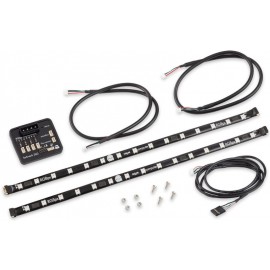
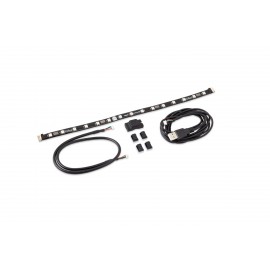
- 1x farbwerk nano set, internal version
- 1x linking nano unit (the controller)
- 1x RGBpx LED strip: length 32 cm, width 10 mm, 15 addressable LEDs
- 1x RGBpx connection cable: length 50 cm
- 1x internal USB connection cable (5-pin): length approx. 1 m
- 4x cable clip, black
- 1x instruction manual
Aquacomputer's manual for the farbwerk nano is an English PDF that covers the connectors, the push-button and every aquasuite setting.