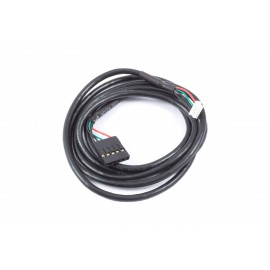
Details
The Aquacomputer VISION Touch with Internal USB Cable (53235) is a high resolution OLED graphic display for data visualization, with a 128x64 pixel screen, four programmable keys and a USB interface. Its cable of about 100 cm ends in an internal connector for a USB header on the motherboard, and an aquabus interface links it to an aquaero 5 or 6.
Properties
- Display
- OLED, 128x64 pixels
- Keys
- 4, programmable
- Connections
- 1 temperature sensor, 1 flow sensor or alarm output
- Interface
- USB (internal connector), aquabus
- Size
- approx. 42.5 x 31 x 9.5 mm without stand
Graphic display
The VISION comes equipped with an OLED panel of 128x64 pixels. Aquacomputer says the OLED technology guarantees an exceptional contrast ratio and a wide viewing angle.
Individually configurable display contents
Display pages can be configured, up to twelve of them, and each can show a variety of PC hardware data. Design layouts to choose from include single value screens, lists, bar graphs and charts. All texts and graphical logos may be modified to accommodate personal preferences, and a note pad function puts short memos on the display.
Four programmable keys
Each of the four device keys can either control the VISION module itself or send USB keyboard commands to the PC. Key functions can be assigned individually for each display page.
Connector for a temperature sensor
The controller features one temperature sensor connector. With a compatible sensor connected, the temperature is constantly monitored and can be used on display pages. If an adjustable threshold is exceeded, an alarm function can trigger a configurable action.
Connector for flow sensor or alternatively alarm output
A second connector serves one of two jobs: it takes an Aqua Computer flow sensor, or it works as an alarm output for emergency shutdown of the PC. Both options require additional accessories that are not included in delivery.
aquabus interface
Through the aquabus interface the VISION connects to an aquaero 5 or 6, and the two devices then exchange various sensor data via that aquabus connection.
What you need to connect it
For temperature readings, add a sensor such as the 70 cm temperature sensor for VISION or the inline G1/4 temperature sensor for VISION. A flow sensor is connected through the flow sensor cable for VISION, OCTO, QUADRO and Farbwerk 360. For the alarm output, the alarm output cable (53216) goes to the mainboard power button header. Linking it to an aquaero 6 LT takes the 4-pin aquabus cable (53214).
aquasuite software
Activating this product gets you the current version of the aquasuite software, including an upgrade service for at least six (6) months. Once the upgrade service expires, you may use and reinstall the latest version released during that period with no time limit. For a fee, the update service can optionally be extended or renewed at any time. An internet connection is required to install and activate the aquasuite software. Further information about the update service and activation is on Aquacomputer's licensing pages.
Dimensions excluding cable
| Without stand | ca. 42.5 x 31 x 9.5 mm |
| With stand attached | ca. 42.5 x 31 x 40 mm |
In the box
- 1x VISION with USB cable (ca. 100 cm, internal connector)
- 1x clip-on stand
- 1x cable tie