Details
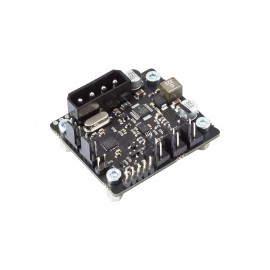
The Aquacomputer Poweradjust 3 USB | Standard Version is a single channel fan or pump controller with a 12 V DC output of up to 30 Watts, a USB interface and two aquabus connectors. It also works as an aquabus expansion device for an aquaero 5 or aquaero 6 unit, and this standard version sets the output manually or by speed, with no temperature control.
Properties
- Channels
- 1 power output, 0-12 V DC, no PWM
- Output power
- 30 W continuous, 36 W with optional heat sink, peaks up to 54 W
- Inputs
- speed signal, temperature sensor, flow sensor
- Interface
- USB, 2x aquabus
- Supply
- 12 V DC from a power supply plug
- Size
- 47 x 41 x 36 mm
One output for a pump or powerful fans
Aquacomputer calls the poweradjust 3 a versatile controller. It is mainly designed for Laing DDC and D5 pumps as well as powerful fans. Beyond those, it is suited to controlling a variety of devices with up to 30 Watts at 12 Volt DC, or up to 36 Watts with an optional passive heat sink. As Aquacomputer's example, a single poweradjust 3 unit in the ultra version can handle temperature dependent control of nine airstream fans on an airplex evo 1080 radiator.
Short term peak loads of up to 54 Watts accommodate the high start-up currents caused by pumps and fans. A programmable start burst helps ensure pumps are supplied with enough power during start-up. The controller keeps checking the speed signal continuously, and the start burst may also be triggered when a missing speed or flow signal is detected. Aquacomputer lists this as start burst repetition upon speed signal failure.
Switching power output
Its connectivity features are the same as on its predecessor, the poweradjust 2. That means a power output with speed signal input, USB, a temperature sensor input, a flow sensor input and a speed signal output, plus aquabus for connection to an aquaero. The main new feature compared to the poweradjust 2 is a power output design in switching power supply technology. Aquacomputer says it is greatly improving efficiency and thereby reducing the waste heat of the unit.
Standard and ultra version
The standard version offers manual control: fixed power, or fixed speed, where the controller regulates output power to hold the speed you set. In addition, the ultra version devices can use the external temperature sensor input for output power regulation. Those temperature control options are mainly derived from the aquastream XT series and can be adjusted to personal needs. The temperature control option is the only difference between standard and ultra version, so if you want it, the poweradjust 3 USB ultra version is the one to pick.
Protection and alarms
Electronics temperature monitoring is there to avoid damage to the unit. Above approximately 80 °C on the internal electronics sensor, the output goes to 100 % power to minimize power dissipation; at approximately 100 °C it is switched off. Various configurable alarm settings regarding temperature, flow and speed signal can be used to prevent damage to your PC due to component failures or inadequate cooling.
Additionally, the speed signal output can forward the fan/pump speed signal, or act as a generic speed signal for alarm forwarding. With the supplied speed signal cable it goes to the CPU fan header of the motherboard, where, depending on the board and BIOS settings, an alarm can initiate an emergency shutdown or an acoustic alarm. Configured as a power switch output, it uses the alarm header cable (53217), which is not included.
aquasuite software
Configuration and monitoring of the poweradjust 3 unit run through comfortable software, fully integrated into the aquasuite software, and the USB interface handles PC communication. All settings can be saved into the device's memory, so the software is not required for operation. Activation gives an aquasuite upgrade service for at least six (6) months; afterwards the latest version from that period stays usable without a time limit. The service can be extended or renewed for a fee, and installation and activation need an internet connection.
What you need to connect it
Power comes from a 4-pin power plug of your PC's power supply unit. The output takes a fan or pump; for a Laing DDC pump the connection cable for DDC pumps (53053) is in the box. The internal USB cable goes to a USB header of the motherboard. For aquabus, the included aquabus/speed signal cable connects the board to an aquaero, such as the aquaero 6 LT; USB and aquabus can be used at the same time. A flow sensor and its special interconnecting cable are not included in delivery. The supplied screws mount the board inside the PC case, clear of metal parts and other electronic devices.
Compatibility
Aquacomputer's manual lists these devices for the aquabus connectors:
- aquaero 6 XT (53146, 53206, 53250, 53251, 53262, 53263)
- aquaero 6 PRO (53145, 53253)
- aquaero 6 LT (53234)
- aquaero 5 XT (53089, 53125, 53249)
- aquaero 5 PRO (53090, 53252)
- aquaero 5 LT (53095)
These flow sensors fit the flow sensor input:
- Flow sensor with 5.6 mm nozzle (53061, requires cable 53027)
- Flow sensor "high flow" (53068, requires cable 53027)
- Flow sensor high flow LT (53291)
- Flow sensor high flow 2 (53292)
These temperature sensors fit the temperature sensor input:
- Temperature sensor inline G1/4 (53066)
- Temperature sensor inner/outer thread G1/4 (53067)
- Temperature sensor G1/4 (53147)
- Temperature sensor plug&cool (53025)
- Temperature sensor 70 cm (53026)
Technical details
| Dimensions W x H x D | 47 mm x 41 mm x 36 mm |
| Power supply voltage | 12 V DC ±5 % |
| Power supply current | max. 5.0 A |
| Fan output voltage | 0-12 V |
| Fan output current | max. 3 A at 12 V, short-term load 4.5 A |
| Fan output continuous power | max. 36 W at 12 V |
| Speed signal connector | "open collector" max. 30 V / 100 mA |
| Ambient temperature range | 10 to 40 °C (noncondensing) |
Notes
- The power output is not short-circuit proof, despite the over temperature protection.
- Turn off the power supply completely, or disconnect the mains power cord, before connecting or disconnecting any cable.
- Components may get very hot during operation; let the device cool down for at least 30 minutes after power off before touching it.
In the box
- 1x poweradjust 3 USB board
- 1x Connection cable for Laing DDC pumps
- 1x 70 cm Internal USB Cable (5pin)
- 1x Speed signal cable
- 4x screws M3 x 4 mm
- 1x Manual
Aquacomputer's manual for the poweradjust 3 USB is an English PDF with the connector pinouts and every aquasuite setting.