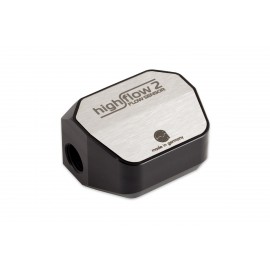
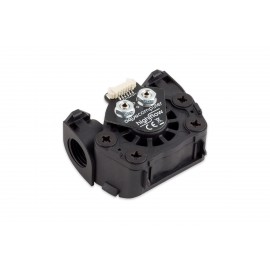
Details
The Aquacomputer G1/4 MPS Flow Indicator | 200 is a G1/4 flow sensor for a PC water cooling loop with a measuring range of approx. 40 to 200 liters per hour. It works by pressure difference measurement and has no rotating parts, and it reports to the PC over USB or to an aquaero 5 or 6 over the 4-pin aquabus interface.
Properties
- Measuring range
- approx. 40 to 200 l/h (11 to 53 US gal/h)
- Thread
- G1/4, two ports, fittings not included
- Interfaces
- USB, 4-pin aquabus
- Inputs and outputs
- water temperature sensor built in, external temperature input, alarm output
- Supply
- 5 V DC over USB or aquabus
- Size
- approx. 55 x 34 x 21 mm
How the mps flow sensor measures
Aqua Computer flow sensors go straight into the cooling loop and keep the flow rate under continuous monitoring. The mps flow series is based on a differential pressure measurement, so it does not require an impeller or any other rotating components. Thanks to the excellent sensitivity of the pressure sensors used inside, only a minimal flow resistance is induced. Aquacomputer says this principle of operation is unique in the PC water cooling sector, and it allows extremely compact sensors. Two M3 threads in the base part let you attach the sensor to the PC case.
Electronics, alarm output and software
Boasting integrated signal analysis, the sensor carries its own microcontroller with a USB and an aquabus interface. A configurable alarm output as well as an integrated water temperature sensor and an external temperature sensor input complete it. Aquacomputer calls it the ultimate sensor for all applications. For monitoring and configuration, the aquasuite software is available for download free of charge.
The alarm output can either act as an artificial rpm signal or as a switching channel. As a speed signal it goes to a fan channel with speed monitoring (e.g. mainboard fan channels), where the board can sound an alarm or shut the PC down, depending on its BIOS. As a switching output it can, for example, light a LED in case of an alarm. Configured as "power switch", it reaches the motherboard's power switch header through the alarm header to power switch cable (53217), which is not included. Besides the measured flow rate, the water temperature and the external temperature input can each raise an alarm.
Three measuring ranges
Currently three versions of the mps flow sensor are available, and each one suits a different flow range. Please choose the sensor most suitable for your system:
- mps flow 100: approx. 20 - 100 liters per hour, 5 - 26 US liquid gallons per hour (Art. 53130)
- mps flow 200: approx. 40 - 200 liters per hour, 11 - 53 US liquid gallons per hour (Art. 53131), this sensor
- mps flow 400: approx. 80 - 400 liters per hour, 21 - 106 US liquid gallons per hour (Art. 53132)
On ModMyMods the three sizes carry item no. 71214 (100), 71213 (200) and 71216 (400).
What the loop needs
The sensor has two G1/4 connection threads and needs two straight fittings, which are not included; they are in our fittings section. For an accurate measurement, Aquacomputer recommends a straight piece of tubing at least 5 cm long before and after the sensor. Angled fittings on the sensor itself alter the flow through it and can falsify the reading up to the point where the sensor is useless. Tighten the fittings gently by hand, so the threads in the plastic body are not damaged, and observe the flow direction marked on the body. With tubing or fittings of a small inner diameter, for example plug&cool (8/6 mm), the mps flow 200 needs a part in its inlet port to harmonize the coolant flow. Aquacomputer warns that without it the sensor readings are not valid.
The USB cable goes to an internal USB header of the motherboard; check that the pin alignment matches before you plug it in. A 4-pin aquabus interface allows direct connection to an aquaero 5 or aquaero 6 (not included) through the 4-pin aquabus cable (53122). After the first setup over USB, the USB link may then be removed, and the aquaero supplies the power. The settings are stored in the sensor's own memory, so the software is not required for operation.
Compatibility
Aquacomputer lists these aquaero controllers for the aquabus interface:
- aquaero 6 XT (53146, 53206, 53250, 53251, 53262, 53263)
- aquaero 6 PRO (53145, 53253)
- aquaero 6 LT (53234)
- aquaero 5 XT (53089, 53125, 53249)
- aquaero 5 PRO (53090, 53252)
- aquaero 5 LT (53095)
Aquacomputer's note: this sensor can not be used with other devices, for example the aquastream pumps or poweradjust controllers. The external temperature sensor input is compatible with all temperature sensors offered by Aqua Computer, and these are on Aquacomputer's list:
- Temperature sensor inline G1/4 (53066)
- Temperature sensor inner/outer thread G1/4 (53067)
- Temperature sensor G1/4 (53147)
- Temperature sensor plug&cool (53025)
- Temperature sensor 70 cm (53026)
The aquaero 5 has carried the ModMyMods item numbers 70213 and 70173 (XT), 70174 (PRO) and 70175 (LT). For the temperature sensors the numbers have been 71162 (inline G1/4), 71160 and 71170 (inner/outer thread G1/4), and 71125 and 71005 (50 cm and 90 cm).
aquasuite software
Activating this sensor gives you the current aquasuite version with an upgrade service for at least six (6) months; the latest version from that period stays usable with no time limit. The update service can be extended or renewed for a fee, and installation and activation need an internet connection.
Technical details
| Dimensions without fittings and without cables | approx. 55 x 34 x 21 mm |
| Connection threads | G1/4, fittings not included |
| Mounting threads | 2x M3, distance 24 mm |
| Power supply voltage (USB/aquabus) | 5 V DC |
| Power supply current | approx. 50 mA |
| Maximum current alarm output | 100 mA, max. 30 V |
| Measuring range temperature sensor input | -35 to 100 °C |
| Ambient temperature range | 10 to 50 °C (noncondensing) |
Notes
- Use only Aqua Computer Double Protect Ultra or an (automotive) coolant based on water and glycol. Non-transparent or opaque coolants are unsuitable.
- After the first start it can take hours until the sensor is completely deaerated and the readings settle; a pump with a deaeration mode speeds this up.
- The calibration data in the software was determined with Aqua Computer fittings. With fittings from other manufacturers, the actual flow rate may differ from the reading.
In the box
- 1x Aquacomputer MPS Flow Indicator
- 1x Internal USB Connection Cable
- 1x Aquabus / RPM Signal Cable (3-pin)
- 1x manual
Aquacomputer's manual for the mps series covers the installation, the connectors and the aquasuite settings.