Details
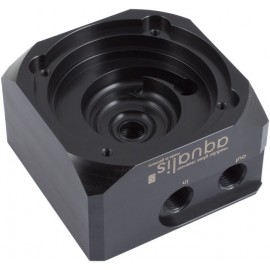
The Aquacomputer Aqualis D5 Pump Top with Fill Level Sensor is a pump adapter (pump top) for D5 pumps, manufactured from durable Delrin, with a fill level sensor of the mps series integrated. It can either be used stand-alone or under an aqualis base series reservoir, but the fill level sensor is only operational with such a reservoir.
Properties
- Pump
- D5 pump motor (Aqua Computer D5, Laing D5 series)
- Ports
- G1/4 threads on top and side
- Material
- Delrin, anodized aluminum clamp ring
- Sensor
- mps pressure Δ40 fill level sensor, USB and 4-pin aquabus
- Bracket
- Stainless steel, included
Stand-alone use
Without a reservoir on top, fittings go into the G1/4 inlet threads on top and on the side of the adapter. The return line connects to one of the central connectors, engraved "in", and the other line to a lateral connector, engraved "out". So the pressure side is always connected to a G1/4 port on the side. Any unused thread is sealed with the two G1/4 sealing screws supplied with the adapter.
In combination with an aqualis base reservoir
Under a compatible aqualis base series reservoir, Aquacomputer says adapter and reservoir form virtually one unit, and the base part sits flush with the adapter. The sockets at the base of the reservoir slide into form-fitting receptacles of the pump adapter. Gaskets on those sockets establish a watertight seal.
First seal the lateral G1/4 thread on the reservoir-facing side with one sealing screw; the central thread there remains open. Four countersunk M4 x 12 mm screws, supplied with the reservoir, fasten it to the adapter. When used with a reservoir, only the threads on the side are accessible, so they must be used to connect the water loop. The return line goes to the central "in" connector, or to the central connector of the reservoir base when using the fountain effect.
Fitting the pump
The adapter holds a D5 pump motor. From a complete D5 pump, only the housing with the electronic components and the impeller are needed, so it is disassembled first. For mounting a D5 series pump, an anodized aluminum clamp ring and a suitable O-ring gasket are provided. Place the gasket in the pump receptacle and insert the motor. Then slide the ring over its rear, where the electrical connections are, without jamming any cables, and secure it with countersunk M4 x 12 mm screws.
Mounting in the case
A mounting bracket made from stainless steel is included in delivery. Four M4 x 20 mm screws, each with a plastic spacer, attach it to the adapter, and four M3 x 8 mm screws with nuts mount the bracket to the PC. An optional decoupling set can also be used in place of the screws and spacers, such as the Ultra Soft Pump Decoupling Kit (41092), which is not included.
Integrated fill level sensor
The sensor installed into this adapter is an mps pressure Δ40. It features an integrated microcontroller with USB and aquabus interface, a programmable alarm output and an external temperature sensor input. For monitoring and configuration, the aquasuite software can be downloaded free of charge. In addition to the USB interface, the 4-pin aquabus interface can directly connect the unit to an aquaero 5/6 controller (not included in delivery).
The alarm output can be configured as an rpm signal for a fan connector with fault detection, for example motherboard fan headers. Alternatively it works as a switched output, for example to connect a LED. Both the fill level and the external temperature sensor input can be set to raise an alarm. That input is compatible with all Aqua Computer temperature sensors.
Additionally, the sensor needs a pressure equalization membrane, which is included in delivery of the pump adapter and is to be installed into the top port of the reservoir.
What you need to connect it
Pump, fittings and reservoir are not included in delivery, as Aquacomputer notes. The reservoirs we carry are in our aqualis BASE reservoir section, and G1/4 fittings in our fittings section.
Aquacomputer lists six controllers for the aquabus interface. They are the aquaero 6 XT (53146, 53206), aquaero 6 PRO (53145), aquaero 6 LT (53234), aquaero 5 XT (53125, 53089), aquaero 5 PRO (53090) and aquaero 5 LT (53095).
For the external temperature sensor input it lists the temperature sensor inline G1/4 (art. 53066), the temperature sensor inner/outer thread G1/4 (art. 53067), the temperature sensor G1/4 (art. 53147), the temperature sensor plug&cool (art. 53025) and the temperature sensor 70 cm (art. 53026).
Compatibility
Aquacomputer lists the adapter as compatible with these pumps and reservoirs:
- Aqua Computer D5 pump motor with speed signal (art. no. 41091)
- Aqua Computer D5 pump motor with USB and aquabus interface (art. no. 41093)
- Aqua Computer D5 pump motor with PWM input and speed signal (art. no. 41105)
- Aqua Computer D5 NEXT (art. no. 41118)
- Laing D5 series pumps and OEM versions identical in construction
- aqualis base for pump adapters (art. no. 34044)
- aqualis base for pump adapters with nano coating (art. no. 34045)
- aqualis base for pump adapters 450 ml with fountain effect (art. no. 34046)
- aqualis base for pump adapters 450 ml with fountain effect and nano coating (art. no. 34047)
- aqualis base for pump adapters 880 ml (art. no. 34051)
- aqualis base for pump adapters 880 ml with fountain effect (art. no. 34052)
- aqualis base for pump adapters 880 ml with fountain effect and nano coating (art. no. 34074)
The same adapter without the sensor is the Aqualis D5 Pump Top (41094).
aquasuite software
Activating the product gives you the current aquasuite version with an upgrade service for at least six (6) months. When it expires, you may keep using and reinstalling the latest version released during that period, with no time limit. The update service can optionally be extended or renewed at any time for a fee. Installing and activating the aquasuite software needs an internet connection.
Notes
- Use light force only when screwing in fittings and sealing screws, so the threads in the plastic base part are not damaged.
- When used without an aqualis base series reservoir, the fill level sensor is not operational.
In the box
- 1x Aquacomputer D5 Pump Top with Fill Level Sensor (pump adapter)
- Clamp ring
- O-ring gasket
- Stainless steel bracket
- Pressure equalization membrane with G1/4 thread
- Internal USB cable
- Mounting material: 4x M4 x 20 mm screws with plastic spacers
- 4x M3 x 8 mm screws with nuts
- Two G1/4 sealing screws
The installation manual shows fitting the pump and both connection layouts, with and without a reservoir.