Details
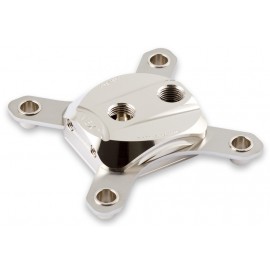
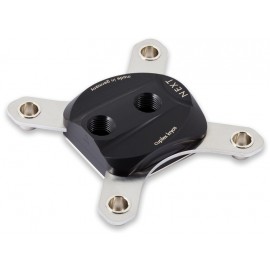
The Aquacomputer Cuplex Kryos NEXT RGBpx black 1851/1700, Acetal/Nickel (21876) is a CPU water block for Intel socket 1851 and 1700, in the material combination acetal/nickel: an acetal top on a nickel-plated copper base. Its 11 addressable RGBpx LEDs sit under a black anodized aluminum cover, and a steel backplate with rubber insulation is part of the scope of delivery.
Properties
- Sockets
- Intel 1851, 1700
- Top
- Acetal housing, black anodized aluminum cover
- Base
- Nickel-plated copper, microstructure under 200 µm
- Connection thread
- 2x G1/4, thread spacing 25.5 mm
- Lighting
- 11 individually addressable RGBpx LEDs
- Dimensions
- 94 x 94 x 22 mm without screws and backplate
A model family, not one cooler
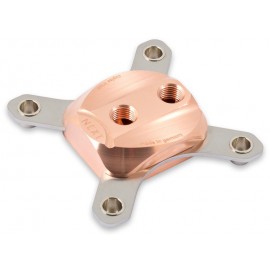
Aquacomputer says the cuplex kryos NEXT represents a new milestone in the development of CPU water coolers. Every detail, by its account, has been analyzed, optimized and tested in order to achieve perfection in the areas of cooling performance, assembly and functionality. The result, it says, is not just a CPU cooler that sets new standards in cooling performance: an entire model family covers a spectrum of color and equipment variants.
Radiator base with microstructure
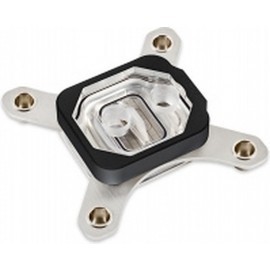
Aquacomputer still calls the cooler base the radiator base. It carries an extremely fine microstructure, and the structure width is less than 200 µm. The coolant flows through a flat nozzle integrated in the cooler housing onto the center of the microstructure, and from there it is discharged in two directions. Depending on the cooler variant, that base is made of copper, nickel-plated copper or .925 sterling silver; this one has nickel-plated copper.
Mounting system
The mounting system consists of solid stainless steel sheets with a material thickness of 2.5 mm, and nickel-plated spring cups are pressed into them. Knurled screws and springs attach the cooler to the mainboard. When installed, the holding system looks very tidy due to the spring cup and the low overall height. All bracket variants have a defined stop for optimal contact pressure and force distribution.
The knurled screws can be fitted by hand, and an Allen key (hexagon socket wrench) also allows for easy installation. The cooler variants for socket 1851/1700 are equipped with a steel backplate with a rubber cover, which additionally stabilizes the CPU region of the mainboard. The block comes as a mounted cooler, with the screws and springs in the mounting kit. Aquacomputer's technical data give it 94 x 94 x 22 mm for socket 1700, screws and backplate not included.
Thermal paste
For optimal performance, each cuplex kryos NEXT comes with 0.5 grams of excellent thermal paste, packed in a syringe for easy use, with a plastic spatula for application. The paste has a high thermal conductivity. Thanks to its low viscosity, it is distributed very well between the CPU and the water cooler during assembly. The supplied quantity is sufficient for approx. five assemblies of the cooler.
Integrated RGBpx LEDs
Under the black aluminum cover, 11 individually addressable RGBpx LEDs are integrated into the cooler. They can be connected to an Aqua Computer device with an RGBpx output through the included 50 cm cable. The connector is on the side of the block, to the left above the "N" of the "NEXT" engraving. More RGBpx components can be daisy-chained from the adjacent connector if required.
Compatibility
Aquacomputer names these products with an RGBpx output for the illumination:
- D5 NEXT (41118)
- farbwerk 360 (53279)
- farbwerk nano (53280, 53281)
- OCTO (53286)
- QUADRO (53256)
To run the LEDs from a common motherboard connector for addressable LEDs, Aquacomputer sells an adapter (product code 53285) separately.
Installation
Remove old thermal grease residues from the CPU, using benzine if necessary. Put a small drop of paste, about 4 mm (0.15 inch) in diameter, in the center of the CPU, or spread a thin layer with the spatula. The backplate and the black insulation mat go below the processor socket. Slide a plastic washer onto each retention bolt and screw the bolts through the four mounting holes of the motherboard into the backplate.
Set the block on the CPU in the orientation the manual shows, slide a spring onto each bolt and start a knurled head screw on each by one or two revolutions. Then tighten the four screws alternately, a fraction of a revolution at a time, until all are fully fastened.
What the loop needs
The two G1/4 connection threads take two fittings. Supply the coolant through the fitting close to the center of the block for best cooling performance. The return line goes to the lateral connector, next to the "NEXT" engraving and the electrical connectors, because a reversed flow direction significantly decreases cooling performance. The loop needs cooling of sufficient performance, and Aquacomputer requires Double Protect Ultra as coolant for corrosion inhibition.
Notes
- Put the water cooling system into operation with no other PC components on mains power, and check the block and fittings for leakages first.
- A component that has been in contact with coolant goes back into operation only once it is completely dry.
In the box
- 1x Water block
- 1x Back plate
- 1x Mounting materials (screws, springs, etc.)
- 1x Thermal compound Thermal Grizzly Kryonaut, approx. 0.5 grams in syringe
- 1x Plastic spatula
- 1x RGBpx connection cable 50 cm
- 1x Instruction manual
The manual gives the assembly instructions for each socket, the flow direction and the RGBpx connection in two pages.