Details
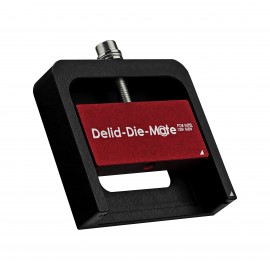
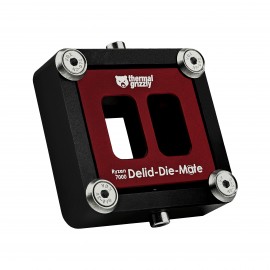
Thermal Grizzly's Intel 1851 Delid-Die-Mate V1 is a delidding tool for Intel processors in the "Intel Core Ultra 200" series (LGA1851 socket). It takes off the Integrated Heat Spreader (IHS) so the CPUs can be cooled using the "Direct-Die" method. The CPU should be heated before the tool is used, which is the job of the matching Delid-Die-Mate Heater. For other chips there are the Intel 13th Gen and Ryzen 7000 versions.
Properties
- For
- Intel Core Ultra 200 CPUs
- Socket type
- Intel LGA 1851
- Material
- Made from aluminum, anodized
- Color
- Black, red
- Size
- 83 x 56 x 26 mm
- Weight
- 145 g, 209 g boxed
Why delidding and the Direct-Die method for Intel processors?
Delidding means removing the heat spreader: the process of separating it from the processor. For processors that are not soldered, it is typically a way to replace the thermal interface material (TIM) between the CPU die and heat spreader. High-quality thermal paste or liquid metal goes in before reattaching the heat spreader. However, since Intel Core Ultra 200 series processors are soldered, this is not an option: taking out the indium solder would create too large a gap between the IHS and the CPU dies. Therefore these CPUs are primarily delidded to allow for Direct-Die, where a cooler such as the Intel 1851 Mycro Direct-Die Pro is mounted directly onto the processor chip. Thermal Grizzly says this enables the most efficient transfer of thermal dissipation power (TDP), or simply put, the heat, from the processor to the cooling loop. By its figures, omitting the heat spreader and mounting the cooler on the dies means temperatures can typically be reduced by 10-15 °C when using liquid metal, such as Conductonaut, as the TIM.
The CPU should be heated!
Before delidding with this tool, heat the CPU to 165°C (the melting point of indium is 157°C) to liquefy the indium, making it easier to remove the heat spreader. That minimizes mechanical stress on the chip and helps prevent damage; otherwise, there is a high risk of damaging the CPU during delidding. Thermal Grizzly's data sheet adds that these chips carry a higher risk than older CPUs, likely because the CPU die consists of multiple smaller dies, called "tiles". It also says household tools (an oven, a heat gun) can do the heating.
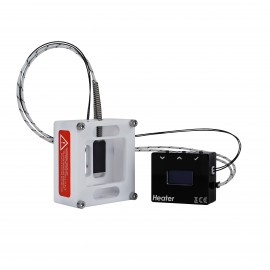
The method the manufacturer calls safest and recommends is the heater. It is a PTFE-made holder for the tool with an integrated heating element, powered via USB Type-C from a smartphone or laptop charger with at least 65 watts (not included). A sensor on the underside of the CPU reports the temperature to an OLED screen, and heating stops on its own at 165°C or after 1800 seconds (30 minutes), after which it can be restarted. PTFE melts above 320°C, resists temperatures up to 260°C and conducts heat very poorly, so the heater can be handled with fire-resistant safety gloves while it is heating.
Compatibility
Thermal Grizzly's compatibility list, verified by its internal tests, names the Intel Core Ultra 9 285K, Core Ultra 7 265K and 265KF, and Core Ultra 5 245K and 245KF. Processors that are not listed are to be considered incompatible.
Warning instructions
- Note and observe these warning instructions before you put a CPU in the tool.
- Caution: taking the heat spreader off a processor (delidding) is done at your own risk.
- Delidding the CPU voids the manufacturer's warranty, and damage caused during delidding is not covered by the manufacturer.
- Caution: it is essential to read Thermal Grizzly's blog post, "Important information regarding the delidding of Intel Arrow Lake CPUs", and to watch the video available on the linked website: https://www.thermal-grizzly.com/en/blog/important-information-regarding-the-delidding-of-intel-arrow-lake-cpus
In the box
- 1x Intel 1851 Delid-Die-Mate V1
- 2x angle wrenches (hex key)
- 1x CPU cleaning tool (TG Scraper)
Thermal Grizzly's data sheet and compatibility list are both PDFs.