Details
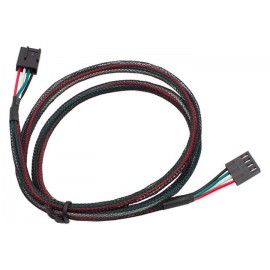
The Aquacomputer Aquastream RPM and Aquabus Cable (93111) is a signal cable, about 50 cm long, with a 3-pin female connector on one end and a 4-pin female connector on the other. It links Aquacomputer devices over aquabus, or it carries the tacho (RPM) signal output of a device such as the aquastream controller to a mainboard fan connector.
Properties
- For
- aquabus connections and RPM signal outputs
- Connectors
- 3-pin female to 4-pin female, wired 1:1
- Length
- approx. 50 cm including connectors
- Pieces
- One
Two uses
As an RPM signal cable, it can be used for connecting the speed signal of a pump or controller to one of the mainboard's fan headers, so the board can read it. It can also be the aquabus link between two Aquacomputer devices, e.g. an aquaero and a multiswitch. The pins are connected 1:1, so nothing is swapped between the two ends.
Compatibility
Aquacomputer lists these device combinations for the cable:
- aquaero 4/5/6 (aquabus) - aquastream XT (aquabus)
- aquaero 5/6 (aquabus) - poweradjust 2 (aquabus)
- aquaero 5/6 (aquabus) - aquaero 5 LT slave (aquabus)
- aquaero 4/5/6 (aquabus) - multiswitch (aquabus)
- aquaero 4/5/6 (aquabus) - tubemeter (requires art. no. 93266)
- aquaero 5/6 (RPM signal) - PC Mainboard (fan)
- aquastream XT (RPM signal) - PC Mainboard (fan)
- poweradjust 2 (RPM signal) - PC Mainboard (fan)
- mps Serie (RPM signal) - PC Mainboard (fan)
- aquaduct (RPM signal, selected models only) - PC Mainboard (fan)
What a run needs
One device with an aquabus port or an RPM signal output, such as the aquaero 6 PRO fan controller, and a free fan header or second aquabus device at the other end. Other cables of this kind are in our fan cables section.
In the box
- 1x Aquastream RPM and aquabus cable (93111)