Details
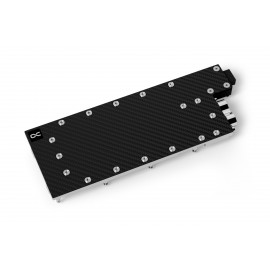
The Alphacool ES H100 80GB HBM PCIe is a GPU water block for the Nvidia H100 80GB PCIe 5.0 graphics card. It is a 1-slot cooler for server and workstation systems with both G1/4 connections on the back, and the black aluminum backplate is in the box.
Properties
- Fits
- Nvidia H100 80GB PCIe 5.0
- Cold plate
- Chrome-plated copper
- Top
- Carbon, matte
- Ports
- 2 x G1/4, on the back
- Slots
- 1
- Backplate
- Aluminum, black, included
Compatibility
Alphacool lists this card for this block:
- Nvidia H100 80GB PCIe 5.0
The block was designed for one PCB layout, and graphics card manufacturers occasionally revise a card so that a cooler no longer fits later models. Before ordering, compare your card and its PCB number with the pictures in Alphacool's GPU configurator. Alphacool also publishes a Compatibility List for Nvidia cards.
One slot in the rack
Alphacool developed its ES Copper/Carbon water cooler with backplate for the Alphacool Enterprise Series. Thanks to the compact design, only 1 slot is needed to mount the cooler in the server rack instead of 1.5 slots as before. Alphacool calls this additional space saving one more argument for using the graphics card water cooler. The top is made of carbon, which makes the block lighter compared to Alphacool's Eisblocks with acetal or acrylic tops.
Connections on the back?
The water input and output have been moved to the back of the cooling block in order to save space in the width and height during installation. Due to this positioning, Alphacool says, the hosing is much easier and significantly simplified in a rack. It also enables easy integration of the GPU cooler into the water circuit, even in the tightest server housings.
More performance!
Alphacool manages to position the cooler as close as possible to the components to be cooled. For this purpose the heat conducting pads used were reduced to 1 mm, and the copper block got the maximum possible reduction in thickness. Together with the optimization of the water flow inside, these steps allow all important components such as GPU, voltage converters and VRAMs to be cooled by water much better and more effectively, Alphacool says. In its words, all of this provides a significant increase in cooling performance.
Chrome-plated copper
The cooler is made entirely of chrome-plated copper. Alphacool says a chrome plating is much harder than a nickel plating and therefore less sensitive to acids, scratches and damage. In its words it completely eliminates the risk of chipping that nickel plating carries. Additionally, Alphacool finds that chrome looks much more homogeneous and provides a shine that cannot be achieved by nickel. It adds that chrome-plated coolers have previously only been used in the industrial sector, in areas where extreme influences act on the coolers.
Copper or aluminum?
All water-bearing parts are copper, the only material Alphacool uses for them. Its reason is that copper has almost twice the thermal conductivity of aluminum and is therefore, for Alphacool, clearly the better choice of material for water cooling. It describes the chrome-plated base as highly resistant to acid, which means, for Alphacool, that chipping of the chrome can be ruled out.
Thermal paste & thermal pads
The included thermal paste is Alphacool's Apex, with a thermal conductivity of 17 W/mK. It is electrically non-conductive and particularly well suited for high contact pressures. The thermal pads are soft, so they fit perfectly to the components, and Alphacool calls them very durable. The 3mm thick pad is given with 3 W/mK, and Alphacool says the 1mm thick pads can dissipate 7 W/mK of heat. Both sizes have their place in the box.
Discreet appearance
Alphacool says the matte carbon finish gives the cooler a noble appearance. For Alphacool that makes it additionally interesting for private users who want to do without aRGB lighting.
What the loop needs
The block has two G1/4 threads, both on the back. Each takes one of the compression fittings for your tube size, which are not in the box. Thermal pads, thermal grease, a putty tool, the PCIe bracket and two sets of screws come with the block.
Technical data
| Dimensions (L x W x H) | 261.89 x 95.71 x 19.40 mm |
| Slot size | 1 |
| Material cooler | Chrome-plated copper |
| Material cooler top | Carbon |
| Threads | 2 x G1/4 |
| Pressure tested | 4 bar |
| Maximum working temperature | 60 °C |
| Color | black, carbon |
Technical data backplate
| Dimensions (L x W x H) | 261.89 x 95.71 x 4.00 mm |
| Material | Aluminum |
| Color | black |
Notes
- Alphacool asks that the block be used only with clear transparent water cooling fluids. It warns that the particles and additives in Pastel liquids can clog and permanently damage radiators, pumps, coolers and hoses, and that this can void the manufacturer's warranty.
- Remove the original cooler on an antistatic mat, taking extreme care if it is held with thermal glue. Clean the card of thermal paste and pad residues with a solvent such as isopropanol alcohol before fitting the block.
- The manual has you use the original GPU mount of the card when the PCB goes onto the block.
In the box
- 1x ES H100 80GB HBM PCIe Cooler
- 1x Backplate
- 1x 65x8x1mm Pad
- 2x 81x8x1mm Pad
- 1x 57x8x1mm Pad
- 1x 15x8x3mm Pad
- 1x Thermal Grease
- 1x Putty tool
- 7x M2x11mm Screw
- 7x M2x5mm Screw
- 1x EVA Washer
- 1x PCIe Bracket
Alphacool's manual and data sheet are both PDF files.