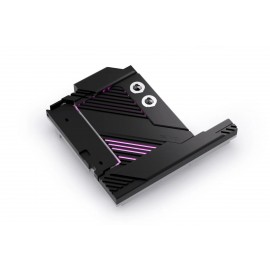
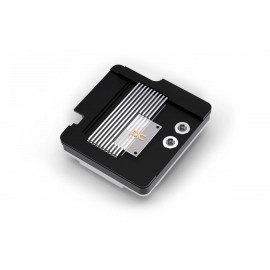
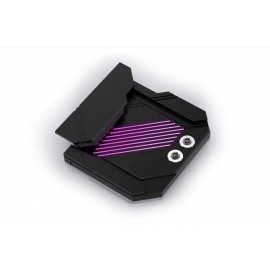
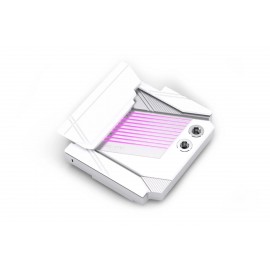
Details
The Alphacool Apex Monoblock for X870 AORUS ELITE WIFI7 AM5 Motherboard is a CPU water block for one motherboard, the Gigabyte X870 AORUS ELITE WIFI7 (AM5) (Rev. 1.0/1.1), and its AM5 socket. It cools not only the CPU but also the voltage regulator modules (VRMs) and the M.2 NVMe SSD located below the CPU socket. Alphacool designed it specifically for this board, so compare the board name and revision before ordering.
Properties
- Motherboard
- Gigabyte X870 AORUS ELITE WIFI7 (AM5) (Rev. 1.0/1.1)
- Socket
- AMD AM5
- Cold plate
- Chrome-plated copper (Cu-HCP)
- Top
- Plexi, with an aluminum cover
- Ports
- 2x G1/4, brass terminal
- Lighting
- 9 LEDs, 5 V DC
Fit
Compatibility is limited to the one board named above. The monoblock takes the place of that board's own coolers, so they come off first. Alphacool's manual has you loosen the M.2 SSD cooler (its component M1) using the lever on the left. Then the I/O cover and VRM cooler (M2) are removed by turning the mainboard over and loosening 4 screws, and component M3 by loosening its 2 screws. The two-piece AMD retention frame is taken off as well. Once all components M1 to M3 have been removed, the mainboard is ready for mounting the block.
The manual then has you install the M.2 SSDs, removing their protective film first, and refers to the mainboard manual for details. The thermal pads are placed on the cooling block, the CPU is cleaned and the thermal grease is applied. The monoblock goes on and is secured with 5 screws. For the X870 AORUS ELITE WIFI7 ICE board, Alphacool makes a separate monoblock.
What it cools
All key motherboard components are actively cooled by the water block within the monoblock: the processor, the VRMs and the M.2 drive. Alphacool calls it the perfect cooling solution for maximum performance and says it cools those parts reliably. It describes the block as ideal for overclocking or continuous operation.
Offset base plate and Jetplate
Like the Apex 1 CPU cooler, this CPU water cooler utilizes an offset cooling base plate. The offset directs the coolant flow precisely to the thermal hotspot of the AM5 CPU. It is combined with the 3D Jetplate 2.0 and a cross-slot design that Alphacool calls proven. This pairing generates high water pressure, enabling what Alphacool calls exceptionally efficient heat dissipation. The technical data names the cooling technology Jet Engine.
Copper and brass
The cooler is milled from a solid block of copper, chrome-plated according to the technical data. Its G1/4 connection terminal is made of brass. Alphacool says the brass terminal, together with the copper base, ensures long-lasting durability and excellent thermal conductivity.
Design and I/O cover
The Apex monoblock design is tailored to each motherboard, and this one features an integrated I/O cover, creating a cohesive overall look. Alphacool says the block, featuring an elegant design, offers optimal cooling performance and integrates seamlessly into the motherboard's aesthetics. In its words the cover blends with the motherboard's design. It sums the block up as combining performance, design and functionality, so that it becomes the highlight of any custom water cooling system.
What the loop needs
The terminal has 2 G1/4 threads. The manual marks one (IN) for the tube that comes from the previous component and the other (OUT) for the tube that leads to the next one. Both take the compression fittings for your tube size, which are not in the box. Connecting the ARGB lighting is the last step of the manual, and the ARGB adapter for it comes with the block. To run, the block needs a pump and a radiator in the same loop.
Technical data
| Dimensions (L x W x H) (in mm) | 173.50 x 175.50 x 54.30 |
| Cooler base material | Chrome-plated copper (Cu-HCP) |
| Material Cover | Aluminum (AlMg0.7Si) |
| Cooler top material | Plexi (LXN866) |
| Material Terminal | Brass (CuZn39Pb3) |
| Terminal connection | 2x G1/4 |
| Material connection thread | Brass (CuZn39Pb3) |
| Maximum torque of the G1/4 thread (in Nm) | 1.00 |
| Maximum torque of the M3 thread (in Nm) | 0.48 |
| Maximum torque of the M4 thread (in Nm) | 1.12 |
| Maximum operating temperature (in °C) | 60 |
| Recommended operating temperature (in °C) | 20 |
| Minimum operating temperature (in °C) | -20 |
| Maximum tested pressure (in bar) | 2.00 |
| Recommended working pressure (in bar) | 0.00 - 1.00 |
| Thickness of cooling fins (in mm) | 0.40 |
| Distance between cooling fins (in mm) | 0.20 |
| Number of LEDs (in pcs) | 9.00 |
| LED length (in mm) | 149.40 |
| LED Voltage (in V DC) | 5.00 |
| LED Amperage (in A) | 0.06 |
| LED Wattage (in W) | 2.70 |
| Cooling technology | Jet Engine |
Technical specifications of thermal pads
| Thermal conductivity of the thermal pads (in W/mK) | 7 |
| Thermal pads hardness ASTM 2240 | 35 Shore 00 |
Technical data Thermal paste
| Volatility rate (24@200 °C) (in %) | less than 0.5 |
| Density (g/cm³) | 3.2 (Test method ASTM D2196) |
| Viscosity (mPa·s) | 150~200*10³ (Test Method ASTM D2196) |
| Operating temperature (°C) | -40 °C to 120 °C |
| Breakdown voltage (V/mil) | 250 (Test method ASTM D149) |
| Thermal impedance (°C in²/W) | 0.1 +/- 0.01 (Test Method ASTM D5470) |
| Maximum operating pressure (psi) | 40 |
| Quantity | 1g |
| Color | Gray |
In the box
- 1x Apex Monoblock
- 1x 15x15x2mm Pad
- 2x 73x8x2mm Pad
- 1x 91x15x2mm Pad
- 1x 91x8x2mm Pad
- 1x 70x22x2mm Pad
- 1x Thermal Grease
- 1x Putty tool
- 4x AM5 Mounting Nut
- 5x Washer
- 5x M3x8mm Screw
- 1x ARGB Adapter
Alphacool's manual for the block is a PDF.