

Details
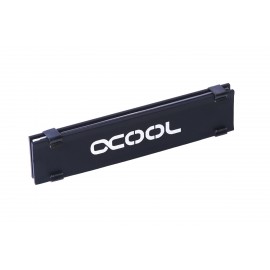
The Alphacool HDX - M.2 SSD M01 - 80mm - Black is a passive M.2 SSD cooler in the 80 mm size: two black aluminum cooling plates held on the drive with clips. Please note that it will only work with a 4.2 mm and some 3.2 mm height SMT connector (M.2 port), and 2.25 mm height SMT connectors will not work. The 110 mm size is the HDX M.2 SSD M02.
Properties
- Cooling
- Passive, two cooling plates
- Cooling plate dimensions (LxWxH)
- 68.3 x 22 x 2 mm
- Material
- Aluminum
- Color
- Black
- M.2 port
- 4.2 mm and some 3.2 mm height SMT connectors, not 2.25 mm
Passive cooling
Alphacool says it is now the first manufacturer to offer a mini cooler for M.2 SSDs. This one provides passive cooling, which in Alphacool's words ensures "better performance power". Alphacool also says the original appearance lets it fit seamlessly into any system. Its technical specifications are short: the material, the color and the plate size above.
Test result
This cooler has been tested with a Samsung 512GB 950 Pro using PCIe 3.0 x4. It lowered the temperature: at full load the drive ran 19 °C lower.
Installation
Everything needed for an easy setup is included: thermal pads, clips and two cooling plates. Alphacool's assembly instructions take two steps. First, the thermal pads are placed onto the chips. Then the cooling plates go on top of these and are fastened with the clips, which Alphacool's page also calls clamps and brackets. The low profile of the plates ensures they aren't in the way during installation, as well as providing more space for air flow and letting them quickly dissipate heat.
Which boards it fits
Alphacool's notice names two motherboards the cooler is not compatible with: the MSI x99s sli Plus and the ASRock Fatal1ty Z170 Gaming-ITX/ac (90-MXGYN0-A0UAYZ). More coolers of this kind are in our M.2 SSD heatsinks section.
In the box
- 2x cooling plates
- 2x thermal pads 0.5mm
- 1x thermal pad 1mm
- 8x clips
Related Products
-
Alphacool HDX - M.2 SSD M02 - 110mm - Black (11747)
Regular Price:
Special Price



