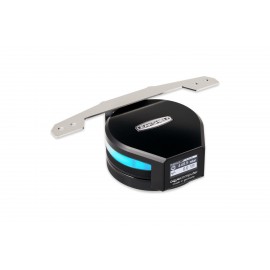
Details
The Aquacomputer LEAKSHIELD Leakage Protection System for ULTITUBE (34137) is a negative pressure leak prevention unit that replaces the top lid of an ULTITUBE series reservoir. It holds the loop at up to 450 mbar of vacuum with an integrated vacuum pump, connects over internal USB, and the ULTITUBE reservoir it needs is not included.
Properties
- For
- ULTITUBE series reservoirs, mounted upright
- Negative pressure
- max. -450 mbar
- Display
- 128 x 64 pixels OLED, rotates 360°
- Interface
- internal USB 2.0, 5 V DC, max. 500 mA
- Size
- approx. 72 x 77 x 29 mm, 140 g
Leak prevention
Thanks to its negative pressure, the LEAKSHIELD actively protects against leaks across the whole coolant loop. If a leak opens, ambient air enters instead, which means no more coolant leaks out of the system. The air that gets in is then pumped out of the system by the integrated vacuum pump, which keeps the negative pressure up. Of course, it does not protect against major damage, such as torn tubes: with a massive leak, for example a completely separated tube, coolant may still exit. Aquacomputer's claim is that the user almost no longer needs to worry about the tightness of the water cooling system. To make sure there is negative pressure everywhere in the loop, the amount can be adjusted to suit the installed coolant pump.
Leak tester, fill level and filling
Even before the water cooling system is put into operation for the first time, the unit checks it for leaks. In leak tester mode it starts by creating a vacuum, and the system is then checked for pressure changes by an integrated, highly accurate pressure sensor. Even minuscule pressure changes are detected, so very small leaks show up, and the leak rate can be displayed in ml/h. By monitoring changes in pressure and the volume of pumped air, the LEAKSHIELD also calculates the current fill level of the reservoir. It can simplify filling, too: drawing the coolant directly from the bottle through an optional suction line avoids the splashing and spills of pouring.
Display, lighting, USB and alarms
The operating status and the measured values can be easily read on the OLED display, which can be rotated 360° for an optimal perspective, even after installation. The integrated RGB LED lighting can be synchronized with the operating status, or individually adjusted to the computer's lighting setup. Together with the aquasuite software, the USB interface lets all data be displayed on the PC. Other data from the aquasuite can also be called up on the OLED display.
An alarm can be set so that the unit makes itself known through the integrated alarm buzzer if a value is under- or exceeded. The alarm is also shown on the OLED display and by the RGB LEDs. For an emergency shutdown of the PC, the LEAKSHIELD can send USB keyboard commands. Its alarm signal header can also press the motherboard's power switch header, short or long, through the connection cable 53216, which is not part of the scope of delivery.
What the loop needs
A reservoir of the ULTITUBE series, such as the ULTITUBE D5 150 reservoir, is required and not included. To install, hold the glass tube, unscrew the top lid anti-clockwise and screw the LEAKSHIELD on in its place. The reservoir must be mounted upright/vertically, because operation is not possible with it installed horizontally. ULTITUBE 50 reservoirs should not be used, as their coolant capacity is insufficient; at least 100 ml of air in the reservoir is needed for safe operation.
All components in the cooling system must be qualified for the configured negative pressure permanently. Parts from suppliers other than Aquacomputer must be checked before starting operation. Especially soft, thin walled tubes are not suitable. As a broad rule, the outer diameter of PVC tubing should be at least 1.5 times its inner diameter, while for PUR tubing a factor of 1.2 is usually sufficient. Hardtubes are generally suitable. Aquacomputer approves coolants of its Double Protect Ultra (DP Ultra) series. For systems with more than one pump, Aquacomputer says to check the total pump pressure, for example by measuring it.
For aqualis, aquatube or aquainlet reservoirs, Aquacomputer offers an adapter version, LEAKSHIELD UNIVERSAL.
aquasuite software
System requirements are Windows 10 or newer and an internal USB 2.0 port. Activating this product gives you the current aquasuite version with an upgrade service for at least eighteen (18) months. After it expires, you may use and reinstall the latest version released during that period without a time limit. The update service can be extended or renewed at any time for a fee. Installation and activation of the aquasuite need an internet connection. Aquacomputer's licensing pages carry further information about the update service and activation.
Technical details
| Dimensions | approx. 72 x 77 x 29 mm |
| Weight | 140 g |
| Material | POM, silicone, PMMA, ABS, PTFE, NBR |
| Generated negative pressure | max. -450 mbar |
| Valve air leakage rate | typ. < 2 ml/min at 300 mbar vacuum |
| Supply voltage | 5 V DC ±5 % via USB |
| Current consumption | max. 500 mA |
| Ambient temperature | 10 to 40 °C (non-condensing) |
| Noise | max. 60 dB, typ. 50 dB in pump mode |
| Acoustic alarm | buzzer, approx. 85 dB |
| Illumination | 6 digitally controlled RGB LEDs |
| Display | 128 x 64 pixels OLED, can be dimmed and switched off |
| Interfaces | USB 2.0, signal for power button |
Notes
- Never touch the membrane on the bottom side of the LEAKSHIELD: a damaged membrane lets moisture in and can make the unit fail. A replacement membrane (34158) is available.
- Under no circumstances use coolants with flammable substances. Coolants with particles can clog or even destroy the membrane.
- To keep the unit running while the PC is in standby, set the USB port in the BIOS so its power supply stays on, or use an external USB power supply.
- Turn off the power supply completely, or unplug the mains cord, before connecting or disconnecting any cable. Check that the USB pin alignment matches the motherboard header.
In the box
- 1x LEAKSHIELD Leakage protection system for ULTITUBE
- One internal USB cable, length approx. 100 cm
The manual covers installation, the electrical connections and every aquasuite setting, and Aquacomputer's FAQ explains how the LEAKSHIELD works and how to set it up.