Details
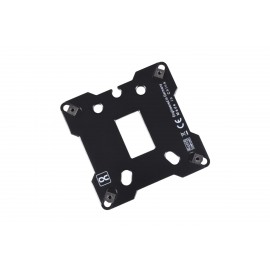
This is a black aluminum backplate for the Intel LGA 1700 socket, made for Alphacool's Eisbaer AIOs and XPX CPU water coolers. It replaces the standard Intel CPU mount on the back of the motherboard and comes with four M4x32 screws.
Properties
- Socket
- Intel LGA 1700
- Size (L x W x H)
- 86 x 86 x 5 mm
- Material
- Aluminum
- Weight
- 67 g
- Color
- Black
- Screws
- 4x M4x32
What it does
Alphacool says the backplate is specially designed for the Intel LGA Socket 1700 to optimize the cooling performance of its Eisbaer AIOs and XPX coolers. It prevents the socket from bending when mounting the cooler. This serves to protect the mainboard and, in Alphacool's words, enables an even and perfect contact pressure. All in all, Alphacool says, this leads to a significant improvement in cooling performance.
Compatibility
The backplate is for all Alphacool XPX CPU water coolers, Eisbaer AIOs and their Solo variants. Alphacool's list:
- Alphacool Eisbaer (Solo & AIO)
- Alphacool Eisbaer Aurora (Solo & AIO)
- Alphacool Eisbaer LT (Solo & AIO)
- Alphacool Eisbaer LT Aurora (Solo & AIO)
- Alphacool Eisbaer Pro (Solo & AIO)
- Alphacool Eisblock XPX
- Alphacool Eisblock XPX Pro 1U
- Alphacool Eisblock XPX 1U
- Alphacool Eisblock XPX Aurora
- Alphacool Eisblock XPX Aurora Edge
- Alphacool Eisblock XPX Aurora Pro
- Alphacool Eisblock XPX Pro Aurora Light
Before you start, the manual says to compare your board with its pictures. Mainboard manufacturers on occasion change the design slightly through revisions, and this may render the backplate incompatible.
Installation
The manual's order: with no CPU in the socket, release its tension, unscrew the four screws of the CPU holder and remove the holder. Place the backplate under the CPU socket, reposition the holder and secure both to the mainboard with the four screws. Never touch the socket pins, and keep high components exposed.
Then install the CPU, spread thermal compound into an even, thin layer (under 0.5 mm) and mount the cooler with the four screws supplied with the backplate. The springs come from the cooler's accessory pack. Tighten all four crosswise by one turn, then repeat the crosswise tightening 7 times. Each screw should then sit approx. 5 mm in the backplate.
In the box
- 1x Alphacool Apex Backplate XPX/Eisbaer LGA 1700 Metal Full Cover, Black
- 4x M4x32 screws
Alphacool's manual and data sheet, with the technical data, are both PDFs.